
How dual pricing works, from the price tag to the receipt.
Every item gets a card price and a cash price. The customer picks how to pay, the terminal rings the matching total, and the receipt shows what they paid. This page walks through each piece, what you have to post, and how George sets it up with you.
Two minutes to start. No obligation. George takes it from there.
The two prices.
We set merchants up on Edge, North's dual-price program, running on Payanywhere devices. Under Edge, the card price is about 4% higher than the cash price. The card price is your posted, regular price. The cash price is the discount from it.
One card price applies to every card: credit, debit, chip, tap or swipe. A debit card gets the card price whether the customer enters a PIN or not. Only cash gets the cash price.
The percentage is the same whether the ticket is a coffee or a brake job, so the dollar difference grows with the ticket.
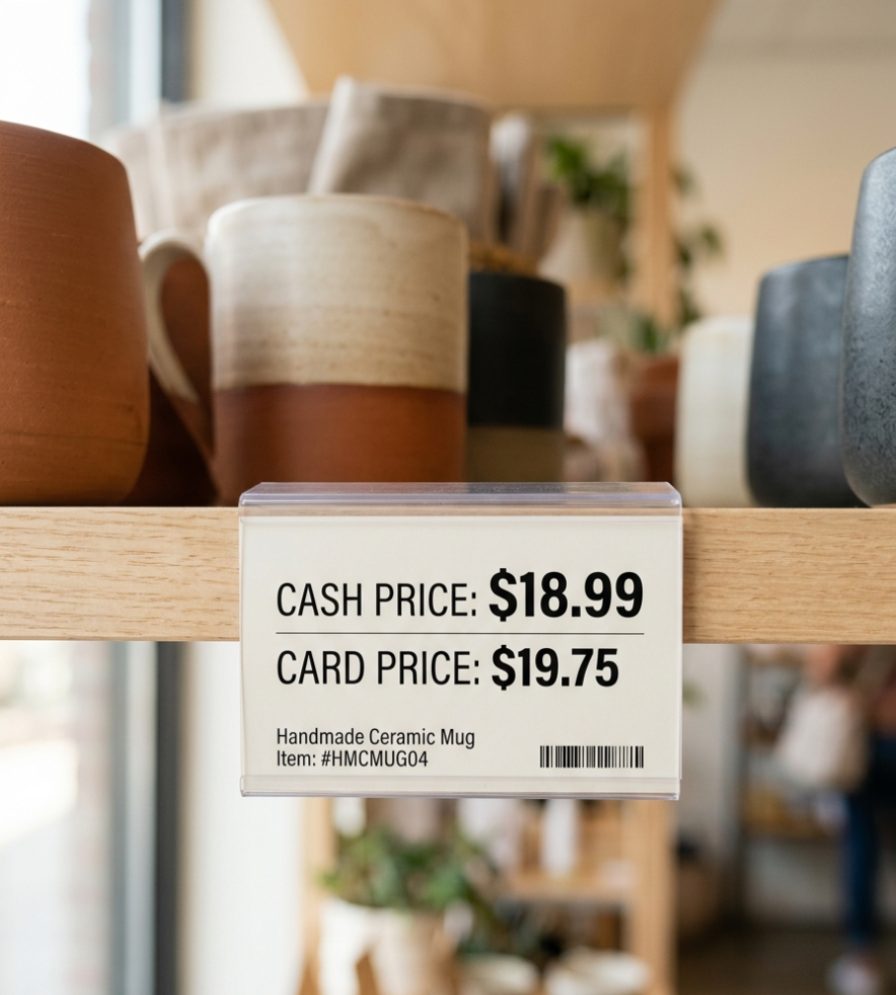
The same rule at every ticket size.
Card price = cash price × 1.04, rounded to the cent.
Want to see your own price list both ways? The Two-Price Menu Maker turns a pasted menu or price list into a printable two-column version.
What your customer sees.
Three places, and each one does part of the explaining.
At the counter
Your menu board, shelf tags or service list show the card price, with the cash price beside it. A notice at the entrance and at the register says items have a cash price and a non-cash price. Nobody has to ask, and nobody gets surprised at the register.
On the terminal
You ring the sale once. The Payanywhere device shows the card total and the cash total. The customer pays by card and is charged the card total, or pays cash and is charged the cash total. Staff don't do any math.
On the receipt
The receipt shows the price the customer paid. There is no extra line for the difference. The customer paid one of the two posted prices, and that's the price on the receipt.
What you must post.
This is the part that matters most, and the part a lot of setups get wrong.
- The card price, always. Card-brand rules require the card price to be posted. Posting a cash price alone, with card buyers paying more at the register, is not a cash discount program, and it can draw card-brand fines that are passed to the merchant.
- The customer notice. North supplies the signage — "Items have both a cash and a non-cash price" — in English and Spanish. Keep it visible at the point of sale; many shops put one on the door too.
- Your state's rules. Dual pricing is legal in all 50 states, but some states say how prices must be advertised. New York, for example, requires the card price to be posted clearly before payment, and Florida food-service businesses have menu and receipt rules to read. Find yours in the state-by-state guide.
- Online and printed menus too. Anywhere you list prices, the card price is shown, with cash as the discount.
Louisiana and Puerto Rico are different. Louisiana's August 2026 debit law hasn't been tested against two-price postings, so we review Louisiana setups before launch. Puerto Rico restricts cash discounting, and we don't set up programs there.
How setup goes with George.
George Fattal has set up independent merchants for more than 20 years. You talk to him from the first call through your first weeks live.
The first call
You tell George how you sell: counter, tableside, phone orders, invoices, online. He explains the program, every cost, and what your state requires you to post. If dual pricing isn't a fit for your business, he'll say so.
Choose a device
A handheld for tableside, a countertop unit with a printer, a full POS with a cash drawer. George matches the Payanywhere device to your counter. See the device lineup.
Price list and signs
Your menu or price list gets a card column and a cash column, and you get the customer notice for your door and register. George checks the wording against your state's rules.
Terminal configured
George configures your device for two prices before you go live, so it shows both totals and prints the price paid. Your merchant agreement, with every fee in it, is reviewed line by line before you sign.
Go live
Signs up, menu updated, first sales rung. George gives you a timeline at the start, since it depends on your paperwork and your device.
George checks in
After you're live, George follows up to see how the counter conversation is going and whether staff or customers have questions. When something comes up later, you call the same person.
Dual pricing vs. surcharging.
They get confused constantly, and the rules are very different. We explain surcharging here so you know the difference. We don't set up surcharge programs. FeeSlicers sets up dual pricing only.
| Question | Dual pricing (what we set up) | Surcharging (education only) |
|---|---|---|
| What's posted? | Two prices: the regular card price, and a lower cash price | One posted price; an extra amount appears at checkout on credit cards |
| Debit cards? | Debit gets the same card price as credit | Never on debit or prepaid cards — federal law and card-brand rules |
| Legal where? | All 50 states (Puerto Rico restricts it; Louisiana needs review) | Banned in CT, ME, MA and PR; restricted in several other states |
| Receipt | Shows the price the customer paid | Must show the extra amount as its own line |
| Before you start | Post both prices and the customer notice; terminal set up for two prices | 30 days' written notice to the processor, plus signs at the entrance and point of sale |
| Cap | Set by the program: about 4% with Edge. Wyoming caps cash discounts at 5%. | Lesser of 3% or cost of acceptance under card-brand rules; some states set lower caps |
State-by-state detail on both is in our legality overview and the 50-state guide.

Background: who's paid on a card sale.
George's first lesson for new merchants is the map of a card transaction, because most owners have never seen it. When a customer taps a card, the sale passes through several parties:
- The issuing bank — the bank whose name is on the customer's card — receives interchange, a percentage plus a per-transaction amount set by the card networks. Rewards cards generally carry higher interchange.
- The card network (Visa, Mastercard, Discover, American Express) sets the rules and charges network fees.
- The processor authorizes the sale, settles the batch, funds your bank account, sends your statement and charges for its service.
That's why the cost of taking cards comes up whenever owners talk about prices. Dual pricing doesn't change who's in that chain. It changes how your prices are posted, and it gives customers a choice in how they pay.
Want to see it on your own menu?
Tell us about your business. George will call, go through the setup and every cost, and show you what your state requires before you sign anything.
Two minutes to start. No obligation. George takes it from there.